The problem

Most MAC-table tools believe what a device says about itself. One forged LLDP frame saying “I am a switch” can turn a desk port into an uplink, and everything behind it goes quiet.

A cloned gateway MAC address can be treated as network plumbing wherever it appears. Both are standard checks in a penetration test.

How it works, illustrated

Impersonation watch: claims are checked, not believedA laptop that says it is a switch, and a gateway's MAC address learned on a desk port. Neither is believed; each raises a High alert with the fix to run by hand.Rule 1 · a claim nothing vouches forSW-B3 Gi1/0/22desk portLLDP frame from the laptop“I am a switch”chassis 00:00:5E:00:53:2AA claim. Any device can send one.Checked, not believedNo confirmed neighbor on this portIt would make a desk port an uplinkThe port stays a desk portDevices behind it stay inventoriedClaim refusedSwitch claim on a desk portHighrogue_switchSW-B3 Gi1/0/22 · Branch 3Held: not offered for bulk sign-offFix: confirm the neighbor, or find the devicelogged: alert_raisedRule 2 · a gateway’s address on a desk portSW-B3 Gi1/0/9desk portMAC learned on this port00:00:5E:00:01:01a VRRP virtual router MACWhat a gateway answers from.Where gateway MACs belongOn uplinks and hypervisor portsGi1/0/9 is a desk portSo it is not hidden as plumbingFlagged, not ignoredGateway MAC on a desk portHighgateway_impersonation00:00:5E:00:01:01 on SW-B3 Gi1/0/9Hardening, run by hand: port security,DHCP snooping, dynamic ARP inspectionlogged: alert_raisedUses tables already polled, so no new reads. The appliance never changes a switch: a person runs every fix.Impersonation watch: claims are checked, not believedA laptop that says it is a switch, and a gateway's MAC address learned on a desk port. Neither is believed; each raises a High alert with the fix to run by hand.Rule 1 · a claim nothing vouches forSW-B3 Gi1/0/22desk port“I am a switch”LLDP frame · 00:00:5E:00:53:2AChecked, not believedNo confirmed neighbor on this portIt would make a desk port an uplinkThe port stays a desk portDevices behind it stay inventoriedClaim refusedSwitch claim on a desk portHighrogue_switchSW-B3 Gi1/0/22 · Branch 3Held: not offered for bulk sign-offFix: confirm the neighbor, or find itRule 2 · a gateway’s address on a desk portSW-B3 Gi1/0/9desk port00:00:5E:00:01:01a VRRP virtual router MACWhere gateway MACs belongOn uplinks and hypervisor portsGi1/0/9 is a desk portSo it is not hidden as plumbingFlagged, not ignoredGateway MAC on a desk portHighgateway_impersonation00:00:5E:00:01:01 on SW-B3 Gi1/0/9Hardening, run by hand: port security,DHCP snooping, dynamic ARP inspectionUses tables already polled: no new reads.It never changes a switch; a person runs every fix.
Impersonation watch. Claims are checked, not believed. Each finding is a High alert with the fix written out; the appliance never changes a switch.
What this shows

Two of the impersonation rules, using tables the appliance already polls. Rule 1: a laptop on SW-B3 port Gi1/0/22, a desk port, sends an LLDP frame saying it is a switch, with chassis 00:00:5E:00:53:2A. Nothing vouches for the claim: there is no confirmed neighbor on that port, and believing it would turn a desk port into an uplink. So the claim is refused, the port stays a desk port, and the devices behind it stay in the inventory. The appliance raises a High rogue_switch alert, holds the port out of bulk sign-off, and says how to fix it: confirm the neighbor if it is real, or find the device. Rule 2: the MAC address 00:00:5E:00:01:01, a VRRP virtual router MAC that a gateway uses, is learned on SW-B3 port Gi1/0/9, another desk port. Gateway MACs belong on uplinks and hypervisor ports, so it is not hidden as network plumbing. The appliance raises a High gateway_impersonation alert, with hardening to run by hand: port security, DHCP snooping and dynamic ARP inspection on that VLAN. The appliance never changes a switch.

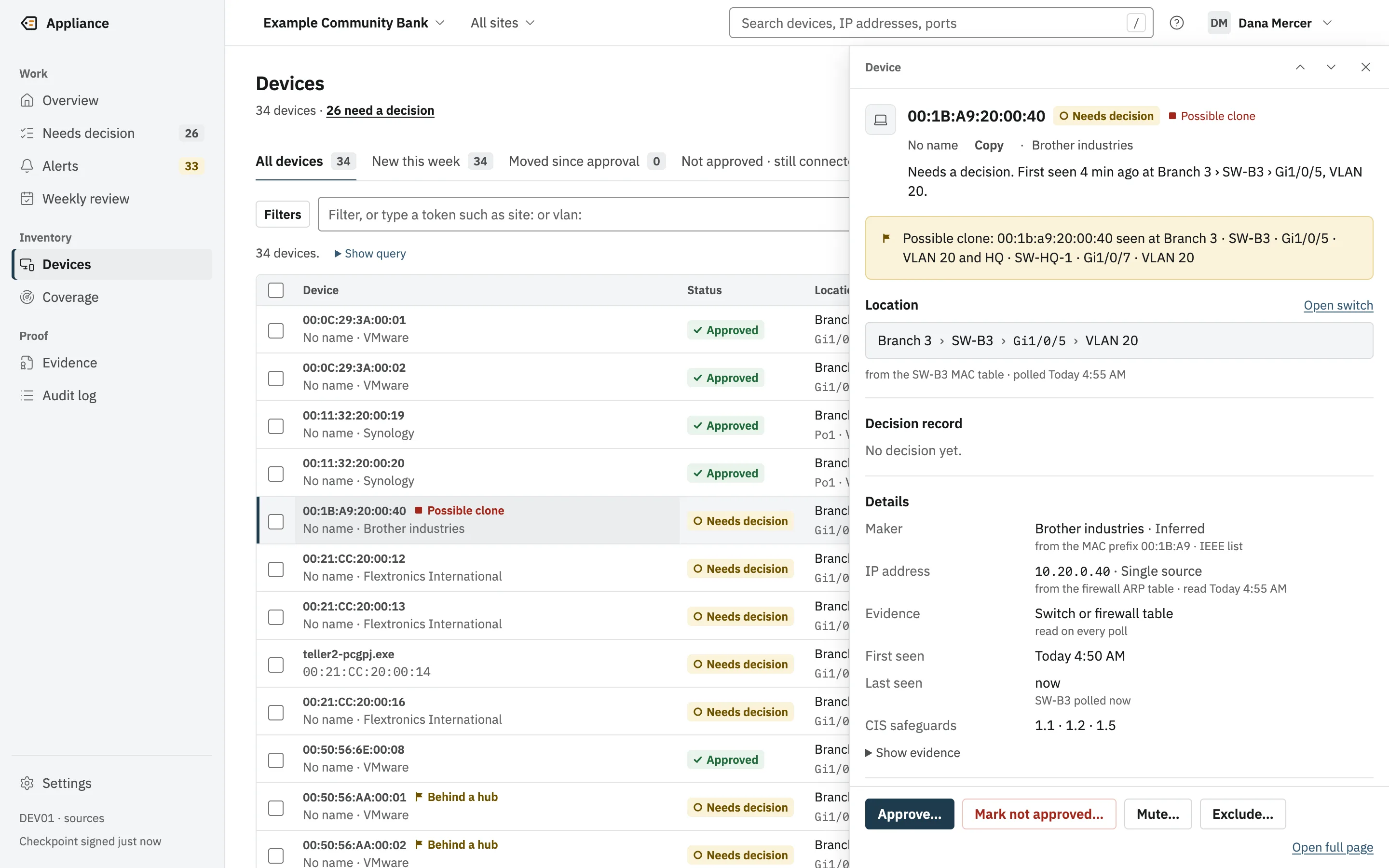
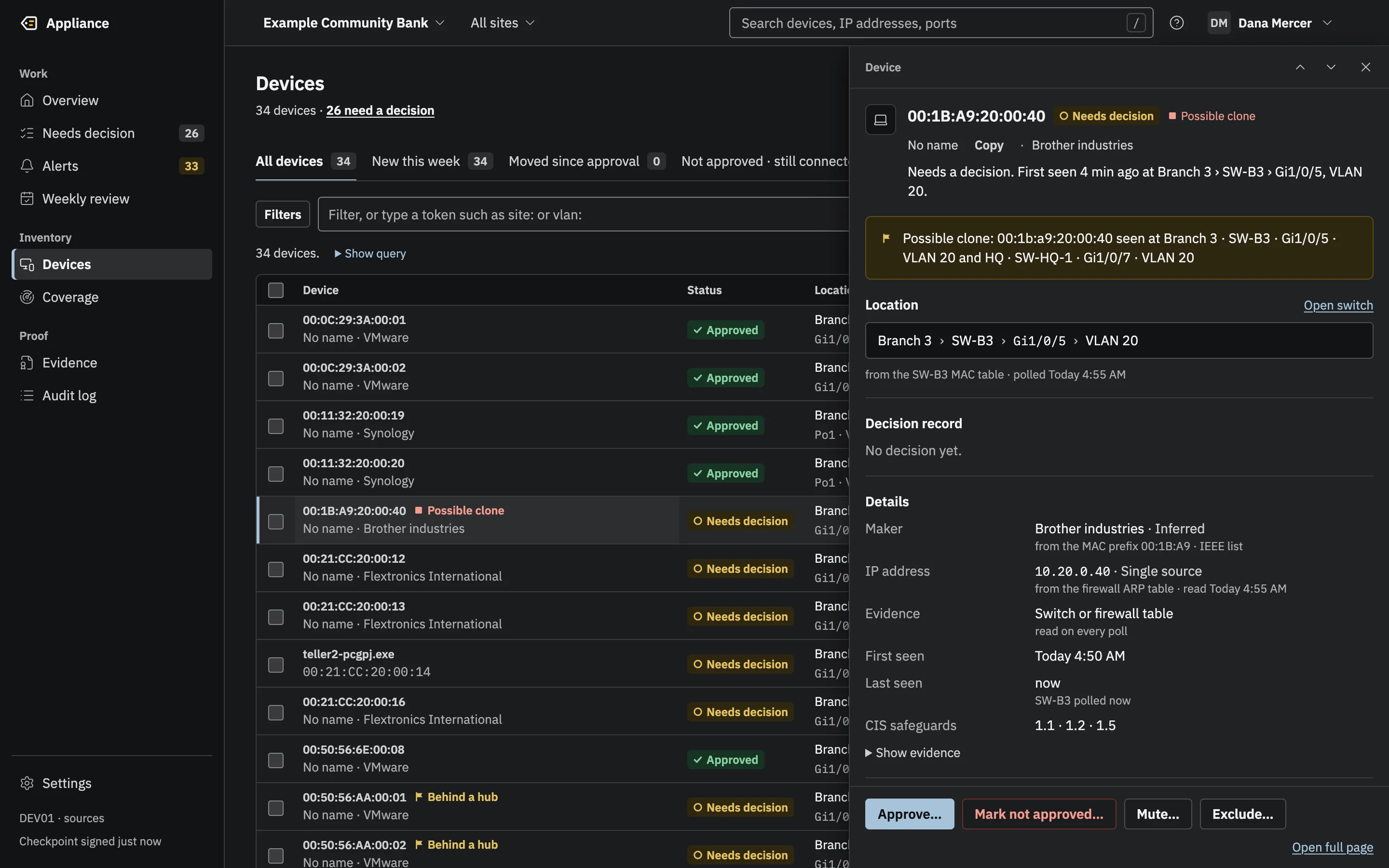
A device drawer flagged Possible clone: the same MAC address seen at Branch 3 and at HQ, with the source of each fact and CIS safeguard references.(opens the full-size image)A device drawer flagged Possible clone: the same MAC address seen at Branch 3 and at HQ, with the source of each fact and CIS safeguard references.(opens the full-size image)
A related rule on screen: one MAC address seen at Branch 3 and at HQ at once, flagged as a possible clone.

Findings arrive as alerts with the reason and, where there is one, the hardening command to run by hand.

The dedicated screens, an Impersonation tab on Alerts and a Confirm neighbor form, are designed and arrive with the new interface.

How it works

  • A neighbor that claims to be a switch, router, phone, access point or hypervisor is not believed if the claim would change the port’s class and nothing vouches for it.
  • A switch claim that uses a monitored switch’s identity is checked against that switch’s own neighbor table. No match is a High alert.
  • A gateway’s virtual MAC (VRRP, HSRP or GLBP), or a network device’s MAC, learned on a desk port is a High alert.
  • A network device’s address, or an approved device’s address, answering from another MAC is a High alert.
  • A desk port carrying more VLANs than a desk uses is a High alert.
  • A held device can never be approved in bulk or in the weekly sign-off. A person deciding it alone, with an authenticator code, still can.
  • It uses tables already polled. No new reads, and it never changes a switch.

What it proves

Nobody can sign off an impostor with one code, because held devices are kept out of bulk approval. Confirming a real neighbor is a signed log entry an examiner can read, and the alert kinds are stable names a SIEM rule can match.

What it records

Entries this feature writes to the tamper-evident audit log. Each one is in the evidence packs that cover its date.

  • alert_raisedrogue_switch, neighbor_disguise, identity_conflict, gateway_impersonation, ip_takeover or trunk_on_edge.
  • neighbor_confirmedAn Admin’s signed statement that a real phone, access point, hypervisor or switch is on a port. neighbor_revoked withdraws it.

Limits

What it does not do yet, stated plainly. The technical page lists every known gap.

  • The screens are not built yet. Today findings appear as alerts and through the data routes.
  • Hardening commands are written in Cisco syntax only.
  • False-positive rates on real equipment are not measured yet.
  • ARP poisoning that never reaches a polled router cannot be seen over SNMP.

Technical detail

Early access: now taking pilot customers.

See it on your own network.

A live demo with the engineers who built it. We bring a simulated network; you bring your questions.